Posts

Showing posts with the label example

Unity3D JSON Serialization (save game data)

Image
Let's keep this short: My BoxingDay activity was to create a small Unity3d project utilizing JSON serialization for saving game data. Basically, this sample project shows how to save and load game data in one serializable class. Whole project is available at Github: https://github.com/jliias/SaveData (I believe it should work as such) In this sample project I will serialize GameData class, that contains following variables: bool adsEnabled int coinsCollected int highScore These variables are packed and unpacked to text format using  JsonUtility  API that can be used to convert Unity objects to and from JSON format. Basically, it is possible to pack and unpack simple objects to text format by using this API (e.g. collections or arrays are not supported). Serializing to JSON is done using ToJson method, and and deserializing using FromJson method. It is important to add [Serializable] to the top of class that will be serialized. This is very simple solut...
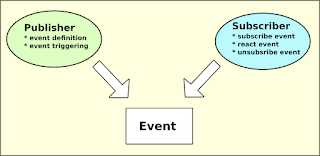
Unity3D events, delegates and Action

Image
Delegates and events are very powerful features of C#. With them you can write clean and efficient code also in Unity. However, I have found delegates bit confusing to understand. Most of the examples I have seen are not so easy to understand, especially if you are a self-taught coder like me. :) Most of the examples I have found are using both delegate and event definitions. Something like this: public delegate void PlayerHit(int damage);  public event PlayerHit onPlayerHit;  But personally, I like using Action<> type instead. It allows you to replace two lines with one and it will make your C# code simpler. It also removes some confusing buzz around delegate definition. Here's an example: public static event Action<int> PlayerHit; So, at least for me this looks more understandable. Please find below two very simple code snippets from my GitHub repository  to see a real life example using Action in defining delegate. In this example event passe...

Re-usable Unity3D scripts at GitHub!

Image
During last couple of years we have created some generic Unity3D C# scripts. These scripts have been design to be re-used at least to some extent, to ease up new game project creation. Now some of them are available for public at GitHub: https://github.com/jliias/CommonUnityScripts We have selected the ones that we think are most readable and understandable and also well (?) commented. New general purpose scripts will be added when there is something we think is worth publishing. Please have a look and see if there's something useful also for you! -Jussi

Unity3D: Camera Shake Effect with C# Example

One of my unfinished Unity3D game projects required camera shaking function, so I wrote one from scratch. I just needed a script that shakes camera for a certain time and magnitude, and can be called from other script. Also, sometimes it would be useful to trigger this from UI button using OnClick(). Added 9.10.2018: This script is now available also at GitHub: https://github.com/jliias/CommonUnityScripts/blob/master/CameraScripts/ShakeCamera.cs Please find script below: Script is added as a script component to the Camera type object and then it should be ready for use. You just have to figure out how and when to trigger it in your own game. I hope that someone will find this script snippet useful! -Jussi

Construct2: Simple 2D Starfield Effect (top-down)

Image
It's been a long time since I was inspired to write a tutorial. But now I am able to provide you one more idea for Construct2 use. There are probably several ways to implement top-down 2D starfield effect in Construct2, but I think this is one of the easiest ones. By using this method, you will need only two particle objects to implement very simple starfield in no time! From events point of view you will need only " on start of layout " event, like this: This example was build for window size of 480x640 pixels, but the layout itself is twice as high (480x1280px). The reason for this is that particle object generates particles from single point only. User can define the size and direction of the cone, but it is not possible to change the width of the creation point. So all generated stars are not moving exactly to the same direction (motion is not parallel). You can get rough idea of layout view from the figure below. To make stars moving as paralle...