Posts

Showing posts with the label unity3d

WestSloth Games 2021 wrap-up

Image
We entered to year 2022 for few days ago, so it is time to check what was achieved during last year.  On 2021 WestSloth Games released total of 4 casual or hyper-casual games: Reaction Training Game Speed Tapping Game Laser Dodger Tower Rescue Hero (still in beta) On top of released games we kept up developing our own hyper-casual development platform on top of Unity3D game engine. It simplifies and speeds up our game development cycle enabling us to concentrate on game mechanics. Platform handles boring tasks like scene management, main state machine, ads and game services integration. Also, it takes care of consent dialog and management nowadays.   In fact, all four games listed above are using some version of platform to implement scene management, main state machine(s) and advertisements. Also, Tower Rescue Hero is also using consent management feature that was introduced in the the 4th version of the platform.  5th version of platform is under planning, and th...

Unity3D mirror using camera and RenderTexture

Image
There are several ways to create mirror in Unity3D. Some of them require more scripting than others, but I will now present an easy way using just one extra camera and RenderTexture.  In this solution you will use RenderTexture on an object and place camera behind that object. This is easy option that does not require scripting. Alternatively you can use reflective shader, but it requires some more work. Seven small steps to create object with mirror RenderTexture: Create new Unity project. It is recommended to use latest LTS version (Long Term Support).I was using Unity 2020.1.3f1 version for this example.   Create plane object for ground and Cube for the mirror object. Scale both objects to match your needs.  Create new camera for attaching the RenderTexture. Position it inside recently created cube and adjust direction so that it is pointing out to the direction where mirror should be reflecting the image.  Create RenderTexture. Name it as you wish. No need t...

Rocket Orbit Android Game

Image
  Today we published new hyper-casual game to Google Play Store (beta version, still).  Game is called "Rocket Orbit" and it is some kind of a facelift for "Rocket to Uranus" game that was published about two years ago.  Biggest modifications were done in visual outlook where original multi-colored UI with (almost) all possible colors is now replaced with restrained set of colors. Main theme consists of different shades of blue. We also added a UFO to bring some randomness to the game.  Playing Rocket Orbit game is simple: You are controlling small blue rocket that is jumping between the planets from one orbit to the second orbit. You need to schedule the tap accurately so your rocket can get to next planet orbit safely.  🚀 Rocket Orbit game features:  ✔️ Easy to play hyper-casual game mechanism ✔️ Yet challenging and hard to master ✔️ Annoying UFO disturbing your perfect game ✔️ Google Play Services Leaderboard ✔️ No levels, just endless space in front o...

Unity3D JSON Serialization (save game data)

Image
Let's keep this short: My BoxingDay activity was to create a small Unity3d project utilizing JSON serialization for saving game data. Basically, this sample project shows how to save and load game data in one serializable class. Whole project is available at Github: https://github.com/jliias/SaveData (I believe it should work as such) In this sample project I will serialize GameData class, that contains following variables: bool adsEnabled int coinsCollected int highScore These variables are packed and unpacked to text format using  JsonUtility  API that can be used to convert Unity objects to and from JSON format. Basically, it is possible to pack and unpack simple objects to text format by using this API (e.g. collections or arrays are not supported). Serializing to JSON is done using ToJson method, and and deserializing using FromJson method. It is important to add [Serializable] to the top of class that will be serialized. This is very simple solut...

Using Unity3D LWRP and shader graphs in real game

Image
My previous Unity3D post was demonstrating my trials with scriptable render pipeline and shader graphs. Now I have gone one step further and combined these techniques with one of my previously released game. "Ball Twister" was originally released about an year ago. I did not advertise it too much because of boring outlook and bit simple gameplay. However, now I have found this game perfect for testing scriptable render pipeline and shader graphs in real 3D environment. Attached video shows how different new version of Ball Twister looks compared to the original one. Original version (on left) is using standard Unity render pipeline and shaders. Enhanced version (on right) is using LWRP (or URP) and shader graphs. In enhanced version, rolling checker board texture, swirling sky and obstacle materials are all using shader graphs to create a sense of movement just by tweaking textures. Basically, only objects that are really moved are black obstacles and coins. Everyth...

Unity3D LWRP Shader Graph demo (rolling checker board)

Image
I started getting familiar with Unity render pipeline usage, because I had plans to utilize that in my upcoming game project. As a by-product I recorded a short video how to create a rolling material (or texture) using Unity3D shader graph. Shader graph is a way to build shaders visually by creating and connecting different nodes. I would think it is simple enough even for beginners after you understand how to setup and use it. My shader graph demo recording is available on WestSloth's Youtube channel . There is no speech included, but I hope it gives at least some idea how Unity3D shader graphs can be utilized. I was using Unity 2019.2.13f1 and created a new project with LWRP template, that automatically brings in required packages needed in this demo. Edit:  I added  another Unity3D shader graph video to Youtube . -Jussi.

Unity3D events, delegates and Action

Image
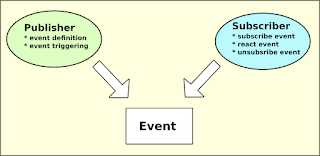
Delegates and events are very powerful features of C#. With them you can write clean and efficient code also in Unity. However, I have found delegates bit confusing to understand. Most of the examples I have seen are not so easy to understand, especially if you are a self-taught coder like me. :) Most of the examples I have found are using both delegate and event definitions. Something like this: public delegate void PlayerHit(int damage);  public event PlayerHit onPlayerHit;  But personally, I like using Action<> type instead. It allows you to replace two lines with one and it will make your C# code simpler. It also removes some confusing buzz around delegate definition. Here's an example: public static event Action<int> PlayerHit; So, at least for me this looks more understandable. Please find below two very simple code snippets from my GitHub repository  to see a real life example using Action in defining delegate. In this example event passe...

Flamingo Tap Tap Run

Image
Edit 9.9.2019: It seems that Flamingo Tap Tap Run is our most downloaded game after one week from publishing. However, I have to admit that few tens of downloads is enough for this "achievement". :)  My game development journey continues with " Flamingo Tap Tap Run " Android game, with pretty simple visual outlook and simplified mechanics. Please download game for free from Google Play Store and have a try! My emphasis with this project was on character animation because my previous games have been using animations for maximum of 4 frames per move. Therefore, this was first time I used Spriter tool for creating and extracting complex animation spritesheets for Flamingo movements. For example, I was using 64 frames for walk animation. After all messing and fumbling result looks pretty ok and at least character animations are lot smoother than in my previous projects. Game logic was created with Unity3D and C#. New tricks (or structures) for me were delegate...

Issue with Unity3D: "Found plugins with same names, and ."

Image
*** IMPORTANT *** Following contains my approach for fixing duplicated plugins error in Unity3D. I have no idea if it is a correct way to do this, but it worked in my case.  BACK UP YOUR PROJECT BEFORE TRYING THIS APPROACH!  *** IMPORTANT *** So. let's start.  I decided to try using Android App Bundle (AAP) instead of regular APK because I got an understanding that it might make game download and installation size smaller. However, I was using bit too old version of Unity3D so I downloaded latest version from their site and converted my exising game project for that. Game conversion from Unity 2018.2.13f1 to 2019.2.0f1 was running smoothly with no errors. But when I tried to compile my little game for Android, I got bit strange error message:  " Found plugins with same name,  and  . Delete the one of the duplicate plugins " (please note the empty spaces around 'and' word).  I have seen something l...

Re-usable Unity3D scripts at GitHub!

Image
During last couple of years we have created some generic Unity3D C# scripts. These scripts have been design to be re-used at least to some extent, to ease up new game project creation. Now some of them are available for public at GitHub: https://github.com/jliias/CommonUnityScripts We have selected the ones that we think are most readable and understandable and also well (?) commented. New general purpose scripts will be added when there is something we think is worth publishing. Please have a look and see if there's something useful also for you! -Jussi

Going hyper-casual (or die trying)

Image
For some reason, hyper-casual games seem to be one of the hottest thing in mobile gaming at the moment. Just do some googling and you will notice that they really are trending. This weekend my target was to do fast-paced game development, starting from a concept and resulting to a published game. And goal was achieved, even though there is still lot of room for improvement. Anyways, my coding skills got some practical exercise, what was the purpose of this project. "Rocket to Uranus" is so-called hyper-casual game for Android. It is available at Google Play Store .   Some statistics: - Total of 15 hours of time (3 evenings) - Approx. 400 lines of new C# code written + ~100 lines of re-used code - 10+ art assets drawn with Inkscape - 2 Unity scenes created - Lots of testing, debugging and bug fixing -Jussi

Unity3D: Camera Shake Effect with C# Example

One of my unfinished Unity3D game projects required camera shaking function, so I wrote one from scratch. I just needed a script that shakes camera for a certain time and magnitude, and can be called from other script. Also, sometimes it would be useful to trigger this from UI button using OnClick(). Added 9.10.2018: This script is now available also at GitHub: https://github.com/jliias/CommonUnityScripts/blob/master/CameraScripts/ShakeCamera.cs Please find script below: Script is added as a script component to the Camera type object and then it should be ready for use. You just have to figure out how and when to trigger it in your own game. I hope that someone will find this script snippet useful! -Jussi

Unity3D: Stuck with Play Game Services plugin

Image
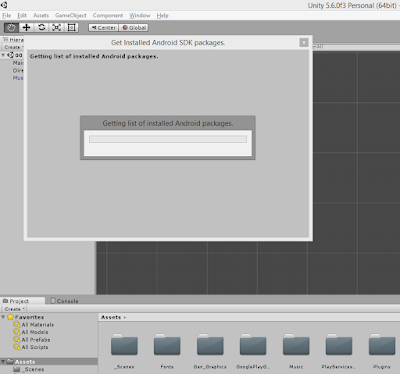
Bananamarine game project has been progressing quite smoothly most of the time. But yesterday I ran into situation where Unity got stuck when I tried to add Google Play Game Services plugin  to my project. I want to have at least leaderboard to my game, so leaving game services out was not an option. Basically, plugin installation was successful, but after that all I got was a dialog window telling: "Getting list of installed Android packages". And tool was not responding anymore, even if I waited couple of hours. I tried to search help for this problem using google, but there were not many hits to help me forward with this issue. Somehow I figured out that this was something related to the Android SDK version(s), so I decided to update my Android Studio installation first. After Android Studio update I removed game services stuff from Unity project, updated SDK path to preferences, and tried to re-install plugin. But result was still the same: I got a dialog telli...

Bananamarine update

Image
Hello, guys! Bananamarine project has progressed almost as planned, and release day is close. From gameplay point of view everything is roughtly done, only some polishing and finetuning is still on To-Do list. I guess most work still to be done is on UI and Google Play Store integration. Then we should be ready for launch. And yes, lots of intensive playtesting is required still. Lots of work has also been done on side activities: We opened yesterday Bananamarine landing page , and Facebook page has also been active for several weeks. There is also new playtesting video available at Youtube (embedded below). Please check it to see how game looks today. I don't want to fix exact release day just right now, because this work is done on hobby basis. But current guess is the week after Midsummer (26th-30th June 2017). So please wait one more week for release. :) -Jussi.

New project: "Bananamarine"

Image
Hi for a long time! Despite the silence WestSloth Games is alive and kickin'. :) I have been working on our next title for couple months, and now it seems that full release can be done within couple of weeks. The name of the game is Bananamarine and currently we have plan to publish it only for Android devices. This will be our first game developed with Unity3D and C#. Player will control small yellow submarine called "Bananamarine". There will be pearls to be collected and mines to be dodged. Also, a mixed selection of very special marine organisms are swimming in this game. If interested, please check attached video from Bananamarine playtest. Basic functionality is working pretty fine and some features are still to be added. All graphics is drawn by me (unfortunately), so please don't mind so-called "coder-art". :) That's all from us at the moment. Be prepared for full launch within June 2017! -Jussi

My first Unity3D app is ready!

Image
After long period of hesitating I started to work on my first Unity3D app. To get things going, I selected very small and simple concept to work with.   Basically, Task Timer is a simple tool to track time used for different tasks. Main features: 3 independent timers that will run also on background and when display is turned off Minimal design: no bells and whistles included. Just the necessary functions! Fully-customizable task names (no limitations) Possibility to export timer data to email template (in csv format) Measurement accuracy: 1 second You can use Littlest Helper: Task Timer for your everyday time tracking tasks. And it is fully up to you how to use the data generated by the tool: Exported csv data can be taken directly e.g. to Excel (or equivalent) and processed as you wish. Get Task Timer from Google Play! I think this app would be a good tool for everyone who is should measure time used for different tasks (project workers, consultants, e...

Unity3D: Convert Seconds to hh:mm:ss Format

Image
Update 17.8.2021: Replaced obsolete Monodevelop with Visual Studio where applicable.  I have gradually started to use Unity3D for game development. So far I have been doing very small and simple test codes just to learn how certain things should be done with Unity. But now I have an example that might be of interest for other wannabe-Unity3D users, at least those who are struggling with converting seconds to HH:MM:SS format. :) So lets begin with this example. First of all, start Unity3D and create new project. This example uses the console only for outputting result, so project can be either 2D or 3D. Whichever you prefer. Create empty object to your scene ( ctrl+shift+N ), or use pulldown menu ( GameObject->Create Empty ). Select empty object and rename it e.g. to " Timer ". Add new C# script component to empty object and name it as " TimerActions " ( Add Component->New Script->write name and select Csharp as script type ): Open TimerAction...

Voxel art avatar for WestSloth Games

Image
I have been playing for couple of days with a voxel editor called MagicaVoxel. Based on my trials I have found it quite interesting and easy-to-use tool for creating some kind of a 3D pixel art. Naturally, there are plenty of other voxel editors available, but so far this is enough for me.  Today I drafted a new avatar for WestSloth Games , the marketing label for the games I have published: We have now updated WestSloth Games social media profiles with this picture, so I really hope this looks like a sloth... :)  If you are interested so see more voxel art from me, please visit WestSloth Youtube channel . I have created there few videos showing how to draw e.g. Minecraft style pig , or Crossy Road style car   in very quick and easy way.  I have also exported object files from MagicaVoxel to Unity3D just to see that I have full flow up and running. Now I just need to draft a good game idea to make use of voxel art... -Jussi

Back to Unity3D

It's about two years since I last time tried to do something with Unity3D. At those days I did not have much gamedev experience. I just took some web based trainings and created couple of demos, but decided to use bit simpler tools for my first game projects. So far I have created several Flash games with Stencyl, and couple of Android games using Construct 2. Although these games are pretty simple and silly, I feel my level of gamedev knowledge has improved a lot by doing these games from the beginning to the end. Now I am trying to get familiar with latest Unity3D tool. I decided to start learning with  free Unity 2D tutorial from Udemy . Obviously there are plenty of other trainings available, but this seemed like a good intro for using the tool. My first impression is that there has been lots of improvements in Unity3D since the version 3 I was using last time. Somehow the tool seems to be easier to use now, or my skills have improved a lot in last two years. :) I hav...

Unity3D, getting to know the tool

As most of you may know, Unity3D is a kind of "industry standard" game creation tool at the moment. I have the impression that it is versatile, reliable and generally works for people making games. And there seems to be very large and active user base for that.  But on the other hand it seems more complex to use than most of the 2D game creation tools I have tried so far. So there might be a little bit higher threshold for starting gamedev activities with Unity than with some simpler development platform. However, My own experience on Unity3D is very limited: I have implemented just few demos for almost two years ago. At that time my gamedev efforts were just starting and I had no clear idea what I was doing. But somehow I managed to get something game-like up and running with Unity. :) So far Stencyl has been my number one tool for developing games. All my released titles have been relatively small and simple, and the target platform has been flash (just to keep things s...