Posts

New HW for gamedev / Lost the spark
Image
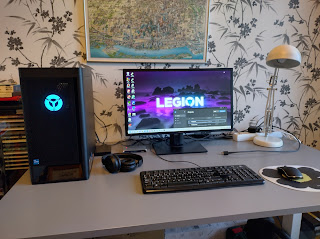
This spring has been pretty quiet for me from gamedev point of view. There has simply been no energy and motivation to start anything new. I've done fixes for some previously released games and tried to draft one new mobile game concept, but that's all. Maybe I have lost my spark? However, decided to upgrade my gamedev hardware last week and bought Lenovo Legion T5 gaming desktop with pretty ok display controller (RTX3060), 16GB RAM and Intel i5 CPU. This is not a true high-end computer, but the price was reasonable and the performance is enough for my use (mobile game development).  Currently there are 500GB+1TB SSD drives working as a mass storage. Backups are taken to 4TB USB drive.  Display is still the same old 24" HD monitor, but I am planning to buy 32" 4K display in close future.  My previous Lenovo Legion laptop has served well for last 4+ years as my main tool for Unity development. But now it is time for it to retire and move to my daughter's use (drawi...

WestSloth Games 2021 wrap-up

Image
We entered to year 2022 for few days ago, so it is time to check what was achieved during last year.  On 2021 WestSloth Games released total of 4 casual or hyper-casual games: Reaction Training Game Speed Tapping Game Laser Dodger Tower Rescue Hero (still in beta) On top of released games we kept up developing our own hyper-casual development platform on top of Unity3D game engine. It simplifies and speeds up our game development cycle enabling us to concentrate on game mechanics. Platform handles boring tasks like scene management, main state machine, ads and game services integration. Also, it takes care of consent dialog and management nowadays.   In fact, all four games listed above are using some version of platform to implement scene management, main state machine(s) and advertisements. Also, Tower Rescue Hero is also using consent management feature that was introduced in the the 4th version of the platform.  5th version of platform is under planning, and th...

Hyper-casual Game Development Platform and Prototyping Service

Image
Fourth version of our hyper-casual game development platform is alive! It simplifies and speeds up our game development cycle enabling us to concentrate on game core mechanics. Platform handles boring tasks like scene management, main state machine, Ads and game services integration, and it also takes care of consent dialog and management. Our hyper-casual platform forms up on Unity package that can be imported basically on any Unity3D project at almost any design stage. At the moment package supports Android development only since we have not yet done any development for iOS. Also, Admob is the only supported ad network in current version, but we are planning to add others later.  There are certain steps to be done to get hyper-casual platform to use:  Create new Unity project (or load existing one) Ensure that target platform is "Android" Import hyper-casual package Select which services you want to use: consent, ads, Google Play Game Services Set up selected services We ar...

Unity3D mirror using camera and RenderTexture

Image
There are several ways to create mirror in Unity3D. Some of them require more scripting than others, but I will now present an easy way using just one extra camera and RenderTexture.  In this solution you will use RenderTexture on an object and place camera behind that object. This is easy option that does not require scripting. Alternatively you can use reflective shader, but it requires some more work. Seven small steps to create object with mirror RenderTexture: Create new Unity project. It is recommended to use latest LTS version (Long Term Support).I was using Unity 2020.1.3f1 version for this example.   Create plane object for ground and Cube for the mirror object. Scale both objects to match your needs.  Create new camera for attaching the RenderTexture. Position it inside recently created cube and adjust direction so that it is pointing out to the direction where mirror should be reflecting the image.  Create RenderTexture. Name it as you wish. No need t...

WestSloth Games year 2020 wrap up

Image
Hello All! For WestSloth Games year 2020 was mostly business as usual. We were still working part-time on game development within the time that was available. Sometimes there was no time at all and sometimes there was some spare time for gamedev. I any case, we accomplished and learned a lot during this year.  Here are some highlights: Major update for Flamingo Tap Tap Run Android game was released in the very beginning of the year. Some statistics with download numbers and ad impressions/eCPM values is revealed in separate blog article .  Couple of updates were done for Flamingo game. These included couple of bug fixes and API level updates. Biggest update introduced embedded minigame to get more shrimps.  A new variant for our previous rocket game was released in June 2020. Rocket Orbit can still be found from Google Play Store, although the number of downloads has so far been bit disappointing. In interested in details, please check separate blog article on rel...

Flamingo Game statistics update

Image
Our reasonably popular Flamingo Tap Tap Run Android game is celebrating 1-year anniversary after a major update in the beginning of January 2020. In this update we introduced several playable Flamingo characters and did some improvements and fixes to gameplay.  Although the game has not been a real breakthrough, the number of new downloads has been fairly steady throughout the year. Advertising revenue has also been steady, and even increased towards the end of the year. We are still talking about less than 10 Euros per month, but with current investment and effort it is just ok. All Flamingo game downloads are organic , since no paid advertising used. And yes, we have not included any in-app purchases in any of our games. I collected couple of graphs showing how the total number of installations and number of new installations (28 days moving average) has developed since the very first launch date in September 2019. Major update was done in the beginning of 2020 and that has be...

Rocket Orbit Android Game

Image
  Today we published new hyper-casual game to Google Play Store (beta version, still).  Game is called "Rocket Orbit" and it is some kind of a facelift for "Rocket to Uranus" game that was published about two years ago.  Biggest modifications were done in visual outlook where original multi-colored UI with (almost) all possible colors is now replaced with restrained set of colors. Main theme consists of different shades of blue. We also added a UFO to bring some randomness to the game.  Playing Rocket Orbit game is simple: You are controlling small blue rocket that is jumping between the planets from one orbit to the second orbit. You need to schedule the tap accurately so your rocket can get to next planet orbit safely.  🚀 Rocket Orbit game features:  ✔️ Easy to play hyper-casual game mechanism ✔️ Yet challenging and hard to master ✔️ Annoying UFO disturbing your perfect game ✔️ Google Play Services Leaderboard ✔️ No levels, just endless space in front o...

Own Fan Product Store: Why?

Image
We got couple of weeks ago new idea: We ordered a few t-shirts with our own designs from one large European print-by-demand service, and started thinking if we could also sell clothes with our own designs for larger audience. We thought that by buying products, our fans (I guess we have some?) could support our operations and at the same time these unique products would act as advertisements for our games. After familiarization to the topic we came to the conclusion that it is worth at least trying it. The risk is quite small because there is no own warehouse and the on-demand vendor takes care of all practical matters (orders, payments, printing, logistics, etc.). It took me approx one evening to set up the account for WestSloth Games, create some initial designs (Flamingos, mostly), and then decide the appearance of the online shop. After that we were ready to go and now we have Fan Product shops up and running world-wide. One shop in EU and one shop at US. Links to both...

How Many Downloads? (Real Data Included)

Image
I will now present a realistic summary how "Flamingo Tap Tap Run" Android game did over the first 6 months. For that I created a graph that shows moving 30 days average for new downloads. It should give a good idea how the number of downloads has evolved after the updates. Graph looks great (really steep slope after major update) as long you don't look the scale on the left hand side. But here come the details: First major version of Flamingo game was available on 3rd of September 2019. It had just one flamingo character and there was no use for collected shrimps. This version got around 50 downloads per month, that has been pretty typical for most of our released little games. Second major version with large update was released on 3rd of January 2020. This one had total of 8 playable flamingo characters which player could buy using the collected shrimps. This update increased the number of monthly downloads to 200+ and it can also be seen from the attached graph. ...

Unity3D JSON Serialization (save game data)

Image
Let's keep this short: My BoxingDay activity was to create a small Unity3d project utilizing JSON serialization for saving game data. Basically, this sample project shows how to save and load game data in one serializable class. Whole project is available at Github: https://github.com/jliias/SaveData (I believe it should work as such) In this sample project I will serialize GameData class, that contains following variables: bool adsEnabled int coinsCollected int highScore These variables are packed and unpacked to text format using  JsonUtility  API that can be used to convert Unity objects to and from JSON format. Basically, it is possible to pack and unpack simple objects to text format by using this API (e.g. collections or arrays are not supported). Serializing to JSON is done using ToJson method, and and deserializing using FromJson method. It is important to add [Serializable] to the top of class that will be serialized. This is very simple solut...

Using Unity3D LWRP and shader graphs in real game

Image
My previous Unity3D post was demonstrating my trials with scriptable render pipeline and shader graphs. Now I have gone one step further and combined these techniques with one of my previously released game. "Ball Twister" was originally released about an year ago. I did not advertise it too much because of boring outlook and bit simple gameplay. However, now I have found this game perfect for testing scriptable render pipeline and shader graphs in real 3D environment. Attached video shows how different new version of Ball Twister looks compared to the original one. Original version (on left) is using standard Unity render pipeline and shaders. Enhanced version (on right) is using LWRP (or URP) and shader graphs. In enhanced version, rolling checker board texture, swirling sky and obstacle materials are all using shader graphs to create a sense of movement just by tweaking textures. Basically, only objects that are really moved are black obstacles and coins. Everyth...

New logo for WestSloth Games

Image
The original logo of WestSloth Games was created by me for several years ago. Basically, it was a hanging sloth that was built using voxels. I guess MagicaVoxel was the tool used to create it. In the beginning logo looked pretty ok. But over time it started to look confusing and not so good anymore. So there was a clear need to draw a new logo. But what kind of a logo is good one? Some views can be found for example from this  article concerning logo design : " A good logo is distinctive, appropriate, practical, graphic and simple in form, and it conveys the owner’s intended message.   " So yes, logo must be at least appropriate, practical and simple. Those were the words I thought I understood.  Additionally, there was also a short list of characteristics of good logo: 1. Simple 2. Memorable 3. Timeless 4. Versatile 5. Appropriate So, I tried to follow these guidelines and started drawing with Inkscape. After 30 minutes of fiddling logo looked like this: ...

Unity3D LWRP Shader Graph demo (rolling checker board)

Image
I started getting familiar with Unity render pipeline usage, because I had plans to utilize that in my upcoming game project. As a by-product I recorded a short video how to create a rolling material (or texture) using Unity3D shader graph. Shader graph is a way to build shaders visually by creating and connecting different nodes. I would think it is simple enough even for beginners after you understand how to setup and use it. My shader graph demo recording is available on WestSloth's Youtube channel . There is no speech included, but I hope it gives at least some idea how Unity3D shader graphs can be utilized. I was using Unity 2019.2.13f1 and created a new project with LWRP template, that automatically brings in required packages needed in this demo. Edit:  I added  another Unity3D shader graph video to Youtube . -Jussi.

Unity3D events, delegates and Action

Image
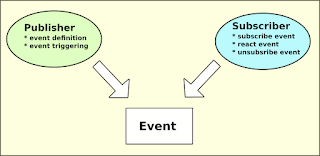
Delegates and events are very powerful features of C#. With them you can write clean and efficient code also in Unity. However, I have found delegates bit confusing to understand. Most of the examples I have seen are not so easy to understand, especially if you are a self-taught coder like me. :) Most of the examples I have found are using both delegate and event definitions. Something like this: public delegate void PlayerHit(int damage);  public event PlayerHit onPlayerHit;  But personally, I like using Action<> type instead. It allows you to replace two lines with one and it will make your C# code simpler. It also removes some confusing buzz around delegate definition. Here's an example: public static event Action<int> PlayerHit; So, at least for me this looks more understandable. Please find below two very simple code snippets from my GitHub repository  to see a real life example using Action in defining delegate. In this example event passe...

Flamingo Tap Tap Run

Image
Edit 9.9.2019: It seems that Flamingo Tap Tap Run is our most downloaded game after one week from publishing. However, I have to admit that few tens of downloads is enough for this "achievement". :)  My game development journey continues with " Flamingo Tap Tap Run " Android game, with pretty simple visual outlook and simplified mechanics. Please download game for free from Google Play Store and have a try! My emphasis with this project was on character animation because my previous games have been using animations for maximum of 4 frames per move. Therefore, this was first time I used Spriter tool for creating and extracting complex animation spritesheets for Flamingo movements. For example, I was using 64 frames for walk animation. After all messing and fumbling result looks pretty ok and at least character animations are lot smoother than in my previous projects. Game logic was created with Unity3D and C#. New tricks (or structures) for me were delegate...

Issue with Unity3D: "Found plugins with same names, and ."

Image
*** IMPORTANT *** Following contains my approach for fixing duplicated plugins error in Unity3D. I have no idea if it is a correct way to do this, but it worked in my case.  BACK UP YOUR PROJECT BEFORE TRYING THIS APPROACH!  *** IMPORTANT *** So. let's start.  I decided to try using Android App Bundle (AAP) instead of regular APK because I got an understanding that it might make game download and installation size smaller. However, I was using bit too old version of Unity3D so I downloaded latest version from their site and converted my exising game project for that. Game conversion from Unity 2018.2.13f1 to 2019.2.0f1 was running smoothly with no errors. But when I tried to compile my little game for Android, I got bit strange error message:  " Found plugins with same name,  and  . Delete the one of the duplicate plugins " (please note the empty spaces around 'and' word).  I have seen something l...

Running multiple domains on one NGINX server

In addition to westsloth.com domain we have now registered westsloth.fi domain for our planned business in Finland (mostly HW/SW consulting and financial and office management services). As we are doing this part-time, we want to keep web hosting costs in control. Therefore we wanted to run the web pages of both domains on same server. The original homepage of WestSloth Games (westsloth.com) has been running on single AWS Lightsail instance. In this solution, the monthly expenses are well-know in advance. But on the other hand server capacity is limited to some level. Anyways, the load for westsloth.com has not been too large for the Lightsail instance to handle it. So we thought we can easily run westsloth.fi on same server too. Westsloth.com webserver is built using NGINX, Gunicorn and Django framework plus local MySQL database. Web page is built using Bootstrap front-end framework. Adding another domain to NGINX setup was done by following these instructions on applicable ...

We are officially a company!

Image
After 6+ years of existence and hobby-based game development, WestSloth Games is now part of a freshly registered company called Westsloth Oy! My family member needed to set up a company for invoicing occasional work, and we decided it's time to make Westsloth a real game company! To secure company's finances our main businesses are computer hardware and software consultancy plus office and financial management services. But game and app development stays as an essential part of Westsloth and we hope games will start generating revenue in the future. This change does not have much impact the way we develop games: At the moment I am doing development on a part-time basis (my day job has priority). But of course things can change. And as before, we know we are still ramping up our game development competence and our target is to do every new game better than the previous one! Transition to company control is ongoing and there will be some changes e.g. in WestSloth Games ...

WestSloth Games: New website with brand-new domain!

Image
In addition to game development hobby I have improved my web development skills by creating and developing websites for my own purposes. Now I have taken a step towards cloud services and web backend by releasing brand-new landing page for our released games: http://www.westsloth.com/ Page features: - Single-page, album-style design - Responsive, scales for all screen sizes - Admin console with login for adding/removing/modifying games entries easily Under the hood: - Django web framework - Bootstrap front-end component library - Local MySQL database. Option to use Postgresql e.g. from Amazon RDS - Gunicorn Python WSGI HTTP server - NGINX web server - Runs on single Amazon Lightsail instance (AWS EC2, in practice) - Amazon Route 53 for domain hosting and DNS Basically, building simple landing page using Django was surprisingly easy: There are plenty of good tutorials available all over the web and almost all issues were solved by googling error messages. It took me...

Re-usable Unity3D scripts at GitHub!

Image
During last couple of years we have created some generic Unity3D C# scripts. These scripts have been design to be re-used at least to some extent, to ease up new game project creation. Now some of them are available for public at GitHub: https://github.com/jliias/CommonUnityScripts We have selected the ones that we think are most readable and understandable and also well (?) commented. New general purpose scripts will be added when there is something we think is worth publishing. Please have a look and see if there's something useful also for you! -Jussi